BambuStudio AI chat + MCP server
in progressSource
- mcp
- ai
- bambustudio
- 3d-printing
- c++
- wxwidgets
A built-in AI chat in BambuStudio, with an MCP server over the app's own internal API, so a prompt builds and slices a model.
Why
Modelling a simple part by hand (a bin, a bracket, a spacer) means switching to CAD, exporting, importing and arranging. The goal is an AI chat built into BambuStudio, with an MCP server over the app’s own internal API, so a prompt like “a 40 mm hex bin with a snap-on lid, 2 mm walls” puts a printable model on the build plate faster than doing it manually.
How it works
Chat panel ──> LLM ──> tool call ──> MCP server (in the app)
                                        │
                               main UI thread
                                        │
add / arrange / slice / render- MCP server: lives inside BambuStudio on
http://127.0.0.1:13619/mcp. Each tool maps to an action the app already has. - Threading: the UI toolkit only allows UI calls on the main thread. Tools run on the server thread and hand each step to the main thread, so arrange and slice can wait for the result without freezing the app.
- MCP first, chat later: any MCP client can connect to a running BambuStudio.
- Chat panel: a native panel on the right of the 3D view, opened with a button that mirrors the sidebar’s or with Tab. It stays open while the AI switches between Prepare and Preview. The conversation runs on a worker thread and calls the same tools directly, without HTTP.
- Providers: one list. Claude with an API key, OpenAI, Gemini, Mistral, Groq, OpenRouter, Ollama, LM Studio or any OpenAI-compatible server. Or Claude through the installed Claude Code CLI, which uses its login and subscription instead of API billing, with only the slicer tools enabled.
Result
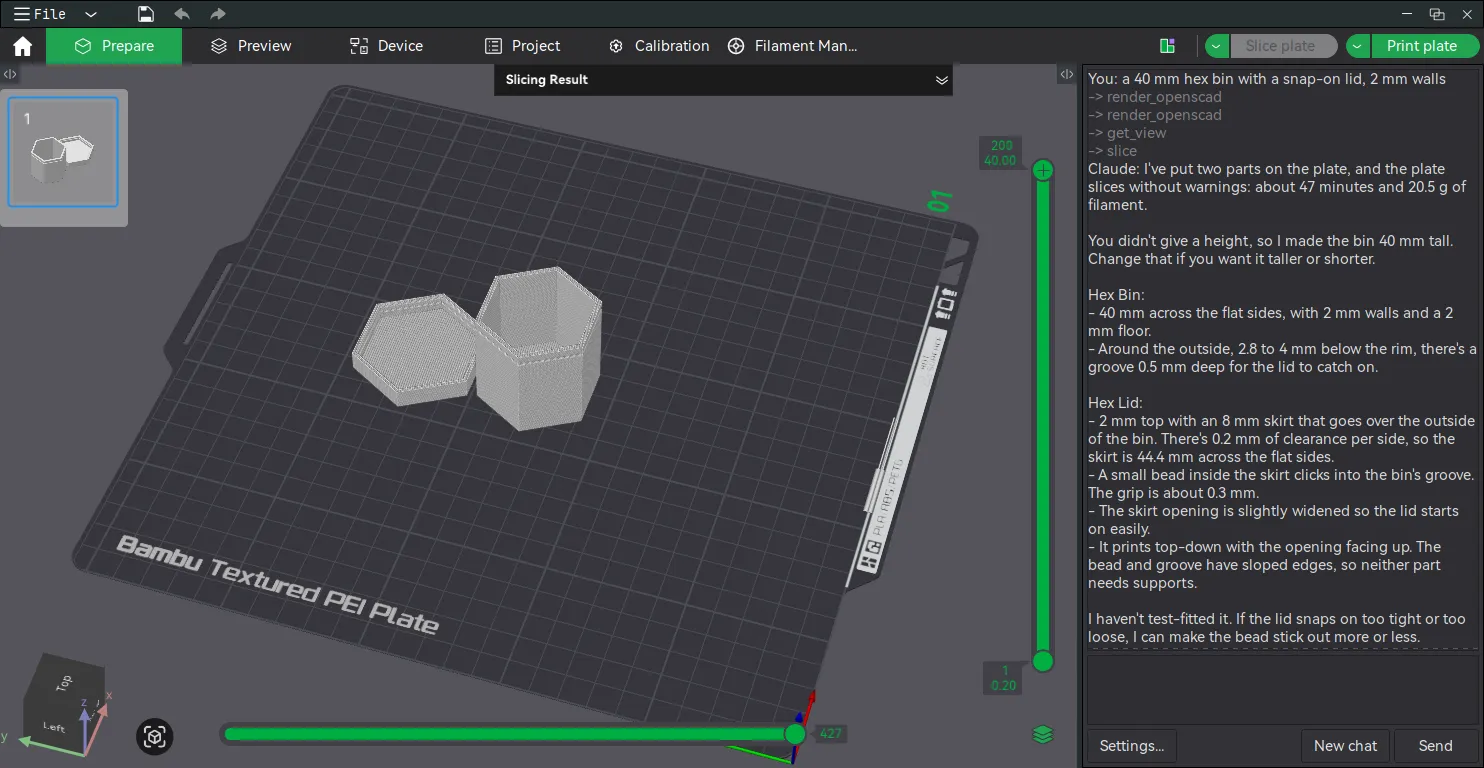
The chat panel sits next to the 3D view. I sent it “a 40 mm hex bin with a snap-on lid, 2 mm walls”, and it modelled the bin and lid with OpenSCAD, checked them with a picture of the plate and sliced them. Then it replied with what it built, the print time and filament use, and what to change if the lid doesn’t fit. Success? I’d say so 😄
Tools
All 22 tools
| Tool | Does |
|---|---|
get_scene | Objects on the plate: names and bounding boxes |
add_shape | Box, cylinder or sphere at an exact size in mm |
render_openscad | Turn OpenSCAD code into a model on the plate |
get_view | A picture of the plate (iso, top, front…) so the AI can check its work |
import_model | Load a model file onto the plate (geometry only, presets untouched) |
delete_objects | Delete objects by name, or clear the plate |
transform_object | Move, rotate and/or scale an object, then drop it onto the bed |
duplicate_object | Copy an object onto free spots, with unique names (“bar 2”, “bar 3”…) |
add_text | Engrave text into, or emboss it onto, the top of an object, with a system font |
export_object | Save an object as an STL in plate coordinates, so OpenSCAD can edit it |
get_settings | Selected presets, filament slots (preset, type, color) and setting values (layer height, walls, infill, supports…), each marked as coming from the preset, the plate or the object |
set_settings | Change process settings for the whole plate or one object; one bad value changes nothing |
select_process_preset | Switch the process preset, e.g. 0.12mm Fine (refused while it has unsaved changes) |
orient | Lay parts on their best face for printing, like the app’s Auto-orient |
arrange | Arrange objects on the plate |
set_object_filament | Print an object with a given filament slot (multi-color) |
select_filament | Choose a slot’s filament preset, e.g. PETG, or add a slot |
slice | Slice and return print time, filament use and the slicer’s warnings; on failure, the reason |
undo | Undo the last change to the plate, like Ctrl+Z |
save_project | Save the whole project as a .3mf (never overwrites a file unless asked) |
open_project | Open a .3mf project (refused while the current one has unsaved changes) |
export_gcode | Save the sliced plate as .gcode or .gcode.3mf (never overwrites a file unless asked) |
Risks and open questions
9 items
- Dialogs: some actions open pop-ups. The tools avoid them where possible (slice skips the button’s first-use pop-ups, delete skips the confirmation). Slicing a plate with post-processing scripts still asks first, which is good. STEP and 3MF imports may still ask questions (untested).
- Safety: slicing is fine to automate. Sending to a printer must always need a human confirmation. Settings that run shell commands after slicing (
post_process) can only be set in the app, never through a tool, and a project that brings its own scripts is never sliced by a tool. - App dialogs: some unusual setting values make BambuStudio show a warning dialog, and the tool call waits until someone clicks it.
- API keys: stored unencrypted in the app config, one per provider. Requests to LLM providers drop the Bambu headers the app adds to every request, such as the device ID.
- Claude subscription: the chat runs my own Claude Code, which is fine for me. Sharing the build so others log in through it gets closer to what Anthropic’s terms restrict.
- Small local models pick wrong tools with twenty-two of them to choose from. Around 14B and up with tool calling works.
- A one-off crash: an X11/OpenGL error (
BadMatch) closed the app once, cause unknown. - Upstream churn: a fork has to keep up with BambuStudio releases.
- License: AGPL-3.0. Using a modified build myself is fine. If I ever share the modified app, its source must be public too.
Roadmap
17 done, 7 to do
- Build the fork on Linux
- MCP endpoint: a real MCP server on localhost, tested from Claude Code
- Tools: shapes, import, delete, arrange, slice
- OpenSCAD and a picture of the plate, so the AI can build and check any shape
- Demo: a hex bin with a snap-on lid, from prompt to sliced plate
-
export_gcodetool - Move, rotate, scale and duplicate objects
- Write on objects: engrave or emboss text, or edit any object with OpenSCAD
- Smoke test script that calls every tool once
- Print settings: read and change layer height, infill, walls, supports, per plate or per object, and pick the process preset
- Slicer warnings and errors in the slice result, so the AI can fix its own mistakes
- Undo
- Save and open projects (
.3mf) - Filament per object and filament presets per slot (multi-color prints)
- Printer presets, filament colors and filament settings like temperatures
- Show per-plate overrides (print sequence, bed type…) in
get_settings - Auto-orient: lay a part on its best face with the app’s own Orient
- Token on the MCP server, so other programs on the machine can’t drive the app
- Several plates: choose the plate for add, arrange and slice, and slice them all
- Model from a photo or sketch of a mechanical part: OpenSCAD, compared against the photo with
get_view - Logos and drawings on parts: emboss or engrave an SVG (PNG traced to SVG), like
add_text - Organic models from a photo: an image-to-3D AI model, imported as a mesh
- Chat panel: the LLM loop, with a list of providers and Claude Code for a Claude subscription
- Check OrcaSlicer for prior art (it is also a fork)
Devlog
3 entries
2026-10-23: Project idea started. Researched BambuStudio’s stack (C++17, wxWidgets, OpenGL). First planned an outside-the-app version with OpenSCAD, then switched to a built-in chat with an MCP server over the app’s internal API. Read the fork’s source: web pages in tabs, reusable internal actions and a local web server all exist.
2026-10-25: Built the fork on Linux and switched the plan to MCP server first, chat tab last, since Claude can already be the client. Added twenty-two tools in one day: shapes, OpenSCAD, a picture of the plate, arrange, slice and export, then moving and copying objects, text on parts, print settings, undo, saving and opening projects, auto-orient and filament slots. That completes the core: a single-plate print, one or several colors, goes from prompt to G-code through tools alone. Slicing now returns the slicer’s own warnings, like “empty layer between 10 and 25.2”. Most of them reuse the app’s own code (its thumbnail renderer, Clone, text tool, settings panel). First demo worked: a hex bin with a snap-on lid, from one prompt to a sliced plate. A crash in the text tool led to tests/mcp_smoke.py, which calls every tool once in under two seconds. A review caught that a tool could set post_process (shell commands run after slicing); that is now refused, and an audit added that tools never slice a project that brings its own scripts.
2026-10-26: The chat: a panel on the right instead of a tab, because the tools switch to the 3D view and would hide a tab. Tab opens and closes it, on key release like the app’s own Tab, after the first version reopened the panel on every release. It started with Claude only. Then came one list of providers, with two API formats underneath, and last Claude Code for a Claude subscription. Two fake servers (tests/chat_fake_llm.py, tests/chat_fake_claude.py) check the tool round trip without a real model.
BambuStudio stack
- Language: C++17 (built with CMake).
- GUI framework: wxWidgets (GTK on Linux) with OpenGL for the 3D view.
- Libraries: Boost, TBB, OpenSSL, libcurl, zlib.
- Web views: several screens are embedded HTML/JS/TS. The chat ended up a native panel instead, docked with the app’s own pane manager (wxAUI).
- Lineage: fork of PrusaSlicer, which is a fork of Slic3r.
Links
- BambuStudio
- Model Context Protocol (MCP)
- BambuStudio wiki
- OrcaSlicer (BambuStudio fork, prior art to check)